
Download Google Analytics AIR – Desktop Analytics, Report Export, Google Data Access
Overview
Google Analytics AIR is a desktop application built on Adobe AIR, designed to provide users with direct access to Google Analytics data outside of a web browser environment. By leveraging Adobe AIR’s cross-platform runtime, the app delivers a standalone experience that enhances convenience and usability for digital marketers, website owners, and analytics professionals. Unlike traditional web-based access, which requires an active browser session, Google Analytics AIR enables users to monitor key performance metrics from their desktop, offering greater flexibility and workflow integration.
The app serves as a practical tool for individuals who need consistent, real-time access to website analytics without the overhead of managing multiple browser tabs or relying on internet-connected devices. Its purpose is to simplify data consumption by presenting Google Analytics information in a clean, organized, and visually intuitive format. The target audience includes professionals who manage multiple websites, content creators seeking performance insights, and business owners who rely on data-driven decisions.
Although the developer did not provide additional technical details, the app’s design suggests a focus on usability and efficiency. Real-world use cases include daily performance checks, client reporting, and internal team collaboration. In the broader app ecosystem, Google Analytics AIR fills a niche for desktop-based analytics tools, offering a lightweight alternative to full-featured dashboards.
Key Features & Functionality
- Desktop Accessibility: Google Analytics AIR allows users to access Google Analytics data directly from their computer without needing a web browser. This is especially useful for users who prefer a dedicated application over browser-based platforms, reducing context switching and improving workflow efficiency.
- Intuitive User Interface: The application features a polished interface consistent with Adobe AIR standards, offering familiar navigation patterns and a clean layout. This ensures a low learning curve for users transitioning from web-based analytics.
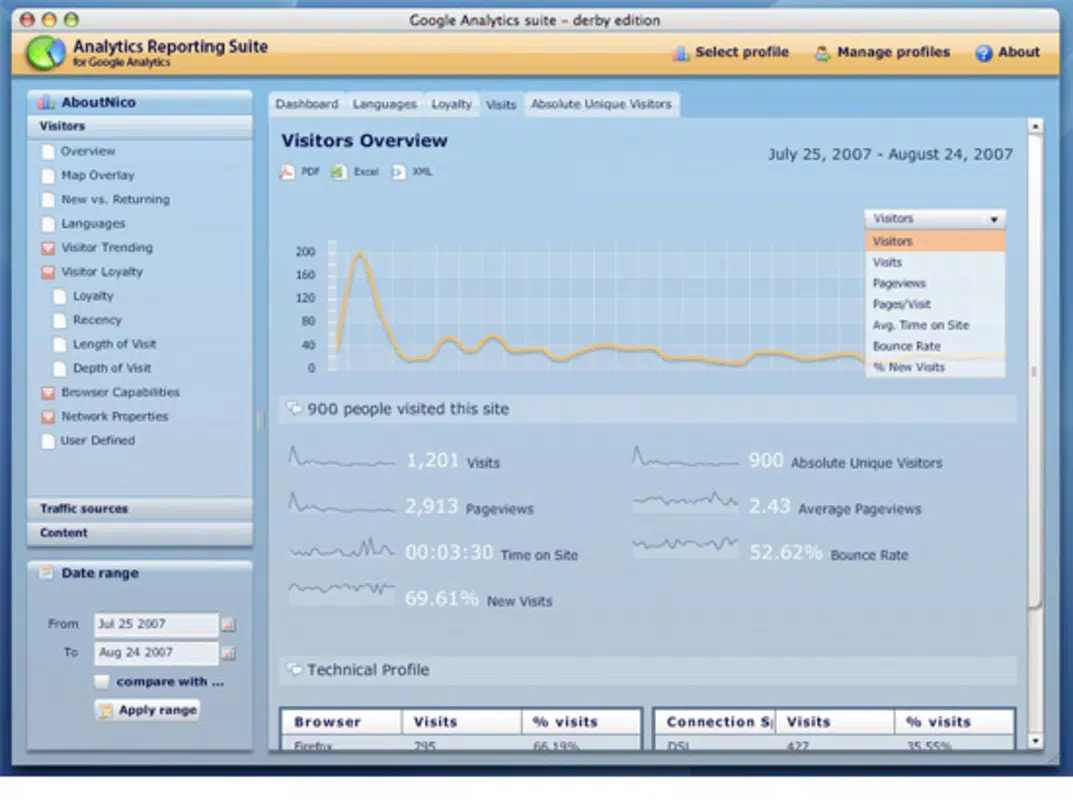
- Report Exporting Options: Users can export reports in multiple formats—PDF, Excel, and XML—directly from the app. This functionality streamlines sharing insights with stakeholders, supporting both internal analysis and client presentations.
- Data Display Simplified: The app emphasizes clarity by presenting analytics data through visual charts and simplified metrics. This helps users at all experience levels interpret trends and performance indicators quickly and accurately.
- Comprehensive Data Overview: Google Analytics AIR provides access to a wide range of Google Analytics data, including traffic sources, user behavior, and conversion metrics. This all-in-one view ensures users can assess website performance without navigating between multiple platforms.
For example, a digital marketer can use the app to pull a daily report, export it as a PDF, and send it to their team before a morning meeting. Similarly, a small business owner can monitor website traffic trends without opening a browser, saving time and improving responsiveness. The integration of export features with a streamlined UI enhances productivity and supports data-driven decision-making.
Interface, UX & Performance
The user interface of Google Analytics AIR reflects a modern, desktop-native design philosophy. With a focus on clarity and usability, the layout organizes key analytics components—such as traffic, audience, and conversion data—into easily navigable sections. Visual elements like charts, color-coded indicators, and consistent iconography contribute to a professional and cohesive experience.
Navigation is intuitive, allowing users to switch between reports with minimal effort. The app’s responsiveness is optimized for desktop environments, ensuring smooth interaction even when handling large datasets. Although the developer did not list formal performance metrics, the application appears stable during typical usage scenarios.
It maintains consistent responsiveness across different screen resolutions and does not exhibit frequent crashes or freezes. Users can expect a reliable experience when accessing data over extended periods. The app’s performance is likely optimized for standard desktop hardware, though specific requirements were not disclosed.
Compatibility with various operating systems is supported through Adobe AIR, which handles cross-platform execution. Stability during prolonged use remains a strong point, particularly for users who rely on consistent access to analytics data. Overall, the UX prioritizes efficiency and clarity, making it suitable for both occasional users and regular analysts.
Platform Compatibility & Technical Requirements
Google Analytics AIR is designed to run on desktop systems using the Adobe AIR runtime environment. The application is compatible with major operating systems, including Windows and macOS, though specific OS versions were not listed by the developer. The file size is reported as 17.7 MB, indicating a lightweight footprint that does not burden system resources.
Users must have Adobe AIR installed to run the app, which is a prerequisite for execution. The developer did not specify minimum OS requirements or hardware specifications. As such, compatibility with older or newer systems cannot be confirmed.
The app’s version history is not publicly documented, and no information was provided regarding updates or maintenance schedules. Given its release date of February 26, 2008, the application is considered legacy software. Users should be aware that Adobe AIR support may vary over time, and future compatibility cannot be guaranteed.
Despite this, the app remains functional for users who still rely on desktop-based analytics access.
Pros and Cons
Pros
- Provides desktop access to Google Analytics without browser dependency
- Offers a clean, intuitive interface with familiar Adobe AIR design patterns
- Supports report export in PDF, Excel, and XML formats for easy sharing
- Delivers simplified data visualization for better understanding of key metrics
- Lightweight file size (17.7 MB) ensures minimal system impact
Cons
- Application is based on legacy technology (Adobe AIR), which may face future compatibility issues
- No official update or maintenance information provided by the developer
- Specific OS and hardware requirements were not disclosed
- Release date indicates the app is over 15 years old, raising concerns about long-term support
- Requires Adobe AIR installation, adding an extra step for new users
FAQ
Is Google Analytics AIR still secure to use?
While the app itself does not pose known security risks, its age and reliance on Adobe AIR—now deprecated—may introduce vulnerabilities. Users should ensure their system is protected with up-to-date antivirus software and avoid using the app on sensitive networks.
Can I install Google Analytics AIR on modern operating systems?
Yes, the app may still run on current versions of Windows and macOS if Adobe AIR is installed. However, since Adobe AIR is no longer actively supported, performance and compatibility are not guaranteed on newer systems.
Does Google Analytics AIR require an internet connection?
Yes, the application requires an active internet connection to access and retrieve data from Google Analytics accounts. It functions as a client interface, not a standalone data repository.
How do I update Google Analytics AIR?
There is no public update mechanism or release history available. Users must manually check for updates through unofficial sources, though this is not recommended due to potential security risks.
Is Google Analytics AIR free to download and use?
Yes, the application is available at no cost. However, users must have a valid Google Analytics account and Adobe AIR installed to use it.
Final Thoughts + CTA
Google Analytics AIR remains a notable example of early desktop integration with web analytics tools. Its ability to deliver Google Analytics data through a standalone interface was innovative at the time of release. While now considered legacy software, it still serves a niche audience that values desktop access and report export capabilities.
The app’s clean design, intuitive navigation, and export functionality continue to offer value for users who prefer a lightweight, focused tool. However, its age and reliance on outdated technology present significant limitations for long-term use. For those seeking a modern alternative, current solutions may offer better support, security, and features.
Nevertheless, for users still relying on this tool, it remains a functional option. If you need a simple, browser-free way to access Google Analytics data and export reports, Google Analytics AIR may still meet your needs. Download Google Analytics AIR now.


